
Fast execution, exact market data, and effective risk management are important for options trading. Multiple screen’s switch to check option chains, analyse charts, and place orders may slow affect the trading decision. Several trading and analytical tools hence come together at Tradejini CubePlus.
A dedicated Option Terminal, real-time market information, basket orders, charting tools, and options analytics are especially available here at Tradejini CubePlus. It also supports mutual funds, SIP, IPOs, and other investment activities.
What Is Tradejini CubePlus?
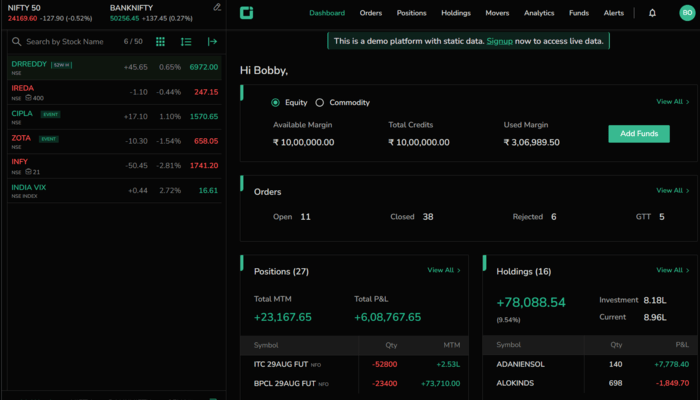
A stockbroker in India named Tradejini owns this trading platform. Its features manage different trading styles like scalping, directional options trading, and multi-leg strategies
Market analysis, order placement, and position tracking are combined here to help you manage your trading activities.
Traders here can see option contracts, compare strike prices, access charts, and examine potential strategy outcomes without regularly switching between different tools.
Key Features of Tradejini CubePlus
1. Paperless Account Opening
A digital account-opening process is available here through eKYC. Traders can then complete the application without a lengthy physical documentation process. Registration here is more convenient only because of its Aadhaar-based verification.
2. Dedicated Option Terminal
You can easily access important contract information in one place using it. Users may directly open it through the Option Chain or an extra option exists in the watchlist. The main features are:
- The index watchlist allows you to add up to 5 indices for fast access to your option contracts
- Expiry Selection is important to switch between available contract expiry dates.
- Strike price filters show you a selected number of strikes above and below the at-the-money price.
- Contract search is useful to find stocks and their connected option trades.
- Quick trading is helpful to access buy, sell, quote, and chart options.
They help traders focus on the relevant contracts as per their market research.
3. Option Chain Analysis and Real-Time Market Data
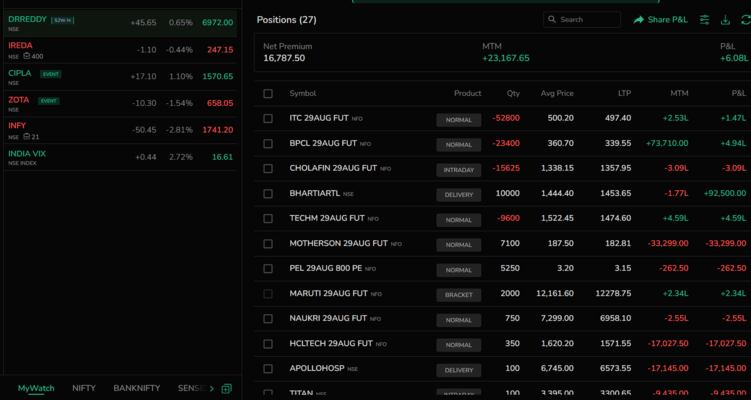
The option chain shows available strike prices & important trading information. Traders here can use metrics like volume, OI, and LTP to test call and put contracts. They can also compare prices and assess market participation using the same metrics.
Options Greeks, implied volatility (IV), VWAP, bid prices, and ask prices are available in the expanded Option Terminal view.
For example, someone analysing NIFTY options can compare activity around different strike prices to search for the right contract for themselves. High open interest, however, doesn’t prove that a price level will act as a resistance.
4. Integrated Charts and Market Depth
CubePlus also offers charts for analysing price movements and searching for potential trading setups. Users here can use TradingView chart integration to work with saved chart layouts and indicators.
Its quote window also shows the market depth, like the top 5 bids and asks. Information like open, high, low, close (OHLC), volume, and open interest is also available here. Traders can therefore easily assess available liquidity before placing orders.
The exact execution price may differ from the displayed prices especially during the rapid market movement’s period.
5. Multiple Order Types and Basket Trading
Market, limit, stop-loss (SL), and stop-loss-market (SL-M) orders are among the supported order types available here. You can even review available funds and required margin before you submit an order.
Basket mode for strategies involving multiple option contracts is also available in CubePlus. For example, traders can add multiple buy and sell legs to a basket after planning a straddle, strangle, or spread.
Its strategy analysis feature also offers a payoff chart, a profit-and-loss table, and a breakdown of the strategy’s Greeks. As a trader, you can use these features to examine potential outcomes and breakeven points before placing orders. They, however, don’t guarantee profit or remove risk involved in investing.
6. Position Tracking and Risk Management
Market movements & portfolio’s overall impact monitoring are required for managing open options. A dedicated section for open positions, closed positions, and open orders is therefore available on CubePlus.
Traders here can review contract details, quantities, average entry prices, and MTM profit or loss. Different views for trading performance can also be accessed here through its Total P&L and Total MTM figures.
Options to exit calls, puts, or all positions are also available here. Users can use them to respond fast if they want to close trade.
7. Options Greeks and Advanced Analytics
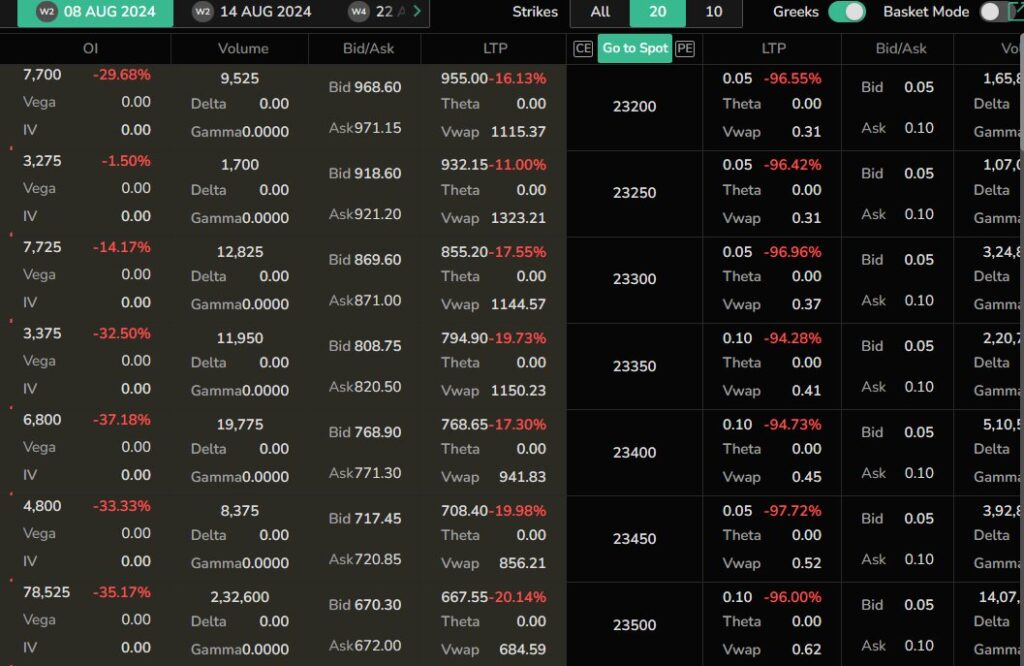
Traders here use Option Greeks to understand how an option’s value could respond to market conditions’ changes.
CubePlus also offers access to these metrics:
- Delta estimates an option’s price sensitivity to the underlying asset’s change
- Gamma measures Delta change as the underlying price moves
- Theta estimates the time decay’s impact on an option value
- Vega measures the change in option premium in implied volatility
Tradejini CubePlus also integrates with NxtOption for extra option analysis. These tools are helpful to assess potential exposure and compare different strategies before investing money here.
8. Mutual Funds, SIPs, and IPOs
It also supports mutual funds, SIPs, IPO applications, and other investment activities. This is the reason why users here enjoy multiple financial services through the platform.
Historical data of more than 10 years is also available here. Investors can use it to examine the companies’ performance. Data availability may differ by company or its metrics.
Read more: Lowest brokerage charges for Options in India: Top 3 Brokers
Research 360 Review: Best Stock Advisory App by Motilal Oswal
FAQs
What is Tradejini CubePlus?
It is a trading platform offering options trading tools, charting, order execution, position tracking, etc.
Does CubePlus support basket orders?
Yes, Basket mode is available for grouping multiple buy and sell orders for strategies like straddles, strangles, and spreads.
Can I analyse options Greeks on CubePlus?
Indeed, the expanded Option Terminal gives Delta, Gamma, Theta, Vega, and implied volatility for option contracts.
Conclusion
Option analysis, charting, order execution, and position management are combined on Tradejini CubePlus within a dedicated environment. It helps traders examine opportunities and manage their positions using the Option Terminal, basket mode, options Greeks, and other brilliant trading features.
It’s also important to review the broker’s current brokerage charges, applicable fees, platform conditions, etc before deciding whether you should trade here.